SoundTrace SDK for Unreal Engine
The SoundTrace Unreal Engine SDK is a real-time spatial audio plugin connecting Unreal audio sources, listeners, and meshes to STCoreV2. Configure acoustic paths, materials, HRTF, and GPU processing through project-wide settings and Actor Components.
Requirements and platforms
| Item | Requirements / support |
|---|---|
| Unreal Engine | 5.6 or newer |
| Supported platforms | Windows x64, macOS, Linux, Android, iOS |
Installation
- Close Unreal Editor and the target project.
- Copy
Plugins/SoundTracingfrom the SDK into the target project'sPlugins/directory. - Open the
.uprojectand enable theSoundTracingplugin. - Complete the C++ module build and restart the Editor.
- Review the global settings under
Project Settings > Plugins > SoundTracing.
YourProject/
└─ Plugins/
   └─ SoundTracing/
      ├─ Content/
      ├─ Source/
      └─ ThirdParty/
Keep Content/STData and ThirdParty/STCoreV2 when distributing the plugin folder. Material
presets, custom HRTF data, and the native runtime use these paths.
Unreal Editor settings
- Open the target platform's
Audiosettings underEdit > Project Settings > Platforms. - Set
Spatialization PlugintoSoundTracing. - Set
Source Data Override PlugintoSoundTracing. - Restart the editor.
- Open
Project Settings > Plugins > SoundTracingand review the global settings.
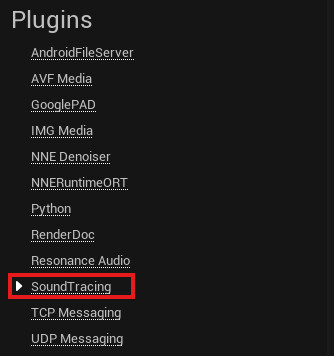
For Windows projects, start with the values below and adjust them to suit the audio workload.
| Setting | Starting value |
|---|---|
Audio Sample Rate | 48000 Hz |
Callback Buffer Frame Size | 1024 |
Buffers To Enqueue | 2 |
Audio asset import settings — mono

Prepare audio sources for SoundTrace spatialization as mono (one channel).
- Export the original audio as a mono PCM WAV file from an audio editor.
- Use
Importin the Content Browser. Unreal creates aSound Waveasset. - Confirm that the Sound Wave has
1channel. - Assign the asset to the Audio Component's
Soundfield.
Mono describes the input source channels. SoundTrace renders headphone directionality relative to the listener. See Unreal audio import documentation for the basic import workflow.
Quick start
- Start with
Quality Preset = FastinProject Settings > Plugins > SoundTracing. - Create a source settings asset from
Sounds > SoundTracing > SoundTracing Audio Spatialization Settingsin the Content Browser. - Create a
Sound Attenuationasset and enableEnable Spatialization. SetSpatialization MethodtoPlugin-Spatializedand add the source settings asset to theSpatialization Plugin Settingsarray. - Assign a mono Sound Wave to the Audio Component. Enable
Allow Spatialization, disableOverride Attenuation, and assign the Sound Attenuation asset toAttenuation Settings. - Add
SoundTracingObjectComponentas an immediate child of theStaticMeshComponentorSkinnedMeshComponentused for acoustic geometry. - Run
Auto Set Materialson the object and adjust material slots as needed. - Start PIE and play the Audio Component. Check runtime readiness and path counts with
SoundTracing.Status. - Add
SoundTracingPathVisualizerComponentto an Actor to display paths.
Manage global configuration in SoundTracing Plugin Settings and query runtime state through SoundTracingSubsystem. Without a Listener Component, the plugin uses the Unreal audio listener transform and the project's default listener settings.
Component overview
| Component | Unreal Engine SDK | Role |
|---|---|---|
| SoundTracing Plugin Settings | SoundTracingSettings, SoundTracingSubsystem | Project configuration and runtime state queries and control |
| Listener | SoundTracingListenerComponent | Listener quality, output settings, and transform overrides |
| Source | SoundTracingSourceSettings + Audio Component | Per-source emission, acoustic paths, and attenuation |
| Sound Object | SoundTracingObjectComponent | Registers meshes, BVH, and material slots |
| Acoustic Materials | SoundTracingMaterialPresetLibrary | Material presets and per-band reflection, absorption, and transmission |
| Sound Path Visualizer | SoundTracingPathVisualizerComponent | Displays acoustic paths with Niagara |
SoundTracing Plugin Settings
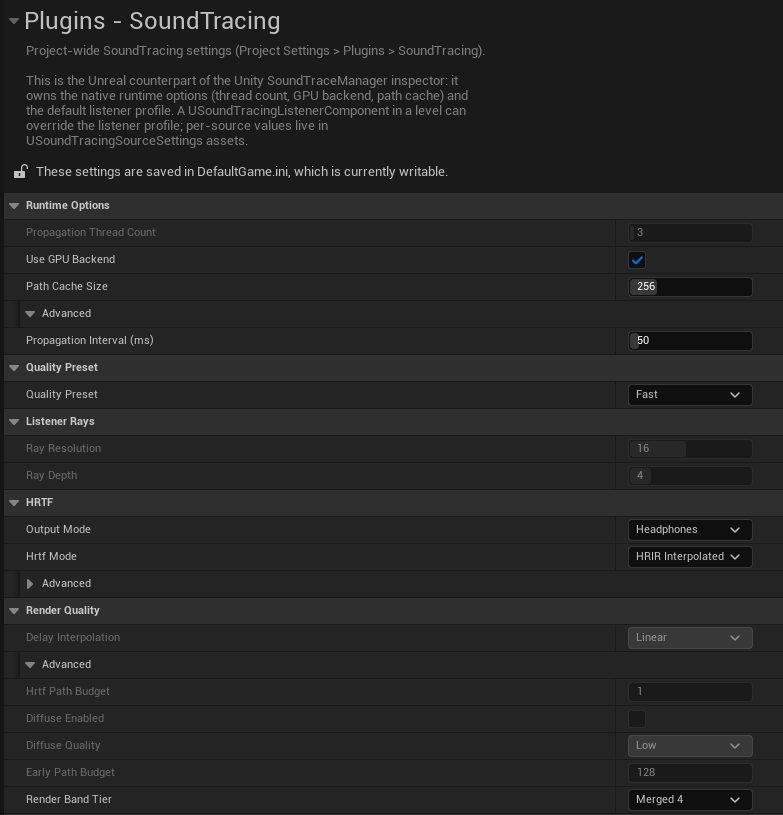
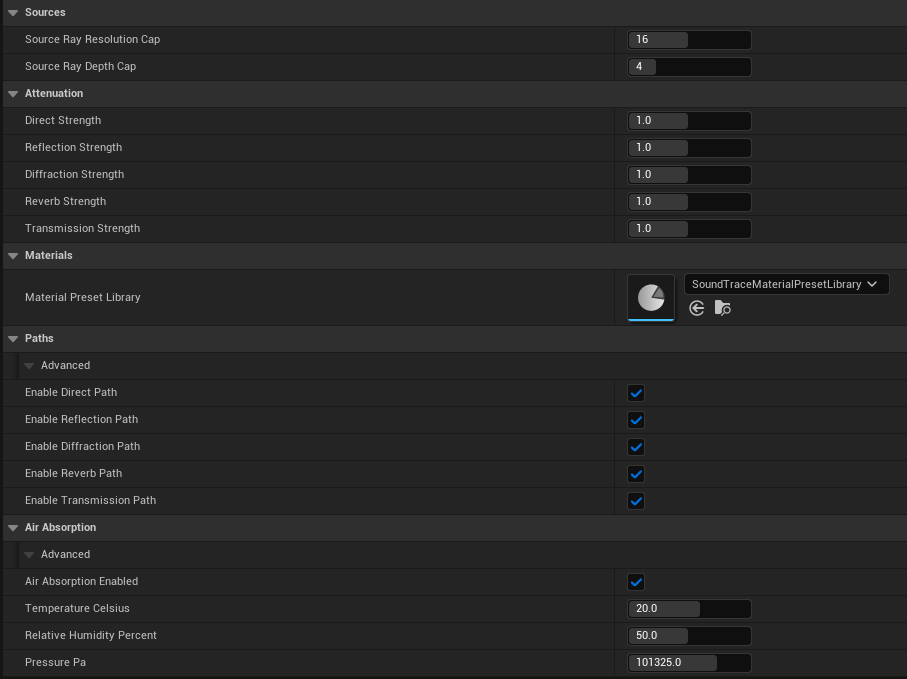
Detail Properties
SoundTracingSettings manages global settings; SoundTracingSubsystem controls the runtime. Edit global configuration in Project Settings > Plugins > SoundTracing. Tables show SDK defaults; the images show example configurations.
| Field | Default | Description |
|---|---|---|
Propagation Thread Count | -1 | -1..64. -1 configures threads automatically from logical core count; 0 and 1 use a single thread. Restart after changing. |
Use GPU Backend | Disabled | Requests GPU processing, with CPU fallback if initialization fails. Restart after changing. |
Path Cache Size | 256 | 0..1024. Path cache shared by active sources. 0 disables caching. |
Propagation Interval (ms) | 0 | 0..500. Minimum interval between propagation requests. 0 requests on each game tick; requests coalesce while processing is in progress. |
Quality Preset, Listener Rays, HRTF, Render Quality | Fast | Default listener profile. Each field is described in the listener Detail Properties table below. |
Source Ray Resolution Cap | 0 | 0..32. Global cap for per-source reverb ray resolution. 0 adds no limit. |
Source Ray Depth Cap | 0 | 0..16. Global cap for per-source reverb ray depth. 0 adds no limit. |
Per-path Strength | each 1.0 | Attenuation strengths for Direct, Reflection, Diffraction, Reverb, and Transmission, in 0.5..1.5. Applies to sources using project attenuation. Higher values attenuate faster at the same distance. |
Material Preset Library | Unassigned | Uses the bundled library when unassigned. Restart after selecting another library. |
Paths, Air Absorption | Enabled | Path families and air absorption for the default listener. |
Public methods
In Blueprint, use Get World Subsystem to obtain SoundTracingSubsystem. In C++, use USoundTracingSubsystem::Get(WorldContextObject).
| Method | Return value / behavior |
|---|---|
Get(const UObject* WorldContextObject) | Static C++ method returning the subsystem for the specified World. |
IsNativeRuntimeReady() | bool. Whether the native library, scene, and listener are ready. |
IsGpuPropagationActive() | bool. Whether GPU propagation is actually active. |
GetGpuBackendStatus() | FString: GPU active, CPU, or CPU fallback (...) with a reason. Returns Unavailable if the runtime cannot be accessed. |
GetLastValidPathCount() | int32. Valid path count from the most recently completed propagation frame. |
GetLastNativeError() | FString. Most recent native error; empty if the latest frame succeeded. |
GetNativeVersion() | FString. Native library version in major.minor.revision format. |
GetRegisteredObjectCount() | int32. Number of objects registered in the current World. |
GetActiveListenerSettings() | FSoundTracingListenerSettings. Listener settings currently applied. |
ResetMotionState() | Resets listener and source motion history after teleporting or changing levels. |
RequestPropagationFrame() | Requests propagation outside the regular update cadence. |
Public properties
These are the C++ configuration members of USoundTracingSettings. Read project settings with GetDefault<USoundTracingSettings>().
| Property | Type | Description |
|---|---|---|
PropagationThreadCount | int32 | Configured propagation thread count. |
bEnableGpuPropagation | bool | GPU request flag. Check actual activation with IsGpuPropagationActive(). |
PathCacheSize | int32 | Path cache size. |
PropagationIntervalMs | int32 | Minimum propagation request interval in milliseconds. |
DefaultListenerSettings | FSoundTracingListenerSettings | Project default listener profile. |
SourceRayResolutionCap, SourceRayDepthCap | int32 | Global resolution and depth caps for source rays. |
DefaultSourceAttenuationStrengths | FSoundTracingAttenuationStrengths | Default distance attenuation strength for each path family. |
MaterialPresetLibrary | TSoftObjectPtr<USoundTracingMaterialPresetLibrary> | Material library to register at startup. |
Listener
Add SoundTracingListenerComponent to a Pawn or Camera to override the project's listener profile per level, or to use this component's transform instead of the Unreal audio-device listener.
Detail Properties
Project Settings and Listener Component share the listener profile fields. The image above shows the project's default profile. The component also exposes the override options below.
| Field | Default | Behavior |
|---|---|---|
Override Project Listener Settings | On | Applies Listener Settings instead of Project Settings |
Listener Settings | Fast | Quality, HRTF, output mode, path, and air-absorption settings |
Drive Listener Transform | Off | Sends this component's world transform and velocity to the native listener |
Only one Listener Component drives the active listener in a World. If another component begins play, it replaces the previous component and writes a warning to the Output Log.
| Listener profile field | Default | Description |
|---|---|---|
Quality Preset | Fast | Selects Custom, Fast, Middle, or Quality. |
Ray Resolution, Ray Depth | 16, 4 | 1..32 and 1..16, respectively. Path tracing resolution and depth, editable in Custom. |
Output Mode | Headphones | Selects headphone or speaker output. |
Hrtf Mode | HRIR Interpolated | See the HRTF table below. |
Custom HRTF Relative Path | Empty string | Custom HRTF path relative to plugin Content. Empty uses the embedded table. |
HRTF Path Budget | 1 | 1..32. Number of top paths receiving directional HRTF processing. |
Diffuse Enabled, Diffuse Quality | Disabled, Low | Controls early scattered sound and its quality. Low/Medium/High retains up to 128/512/1024 scattered paths. |
Delay Interpolation | Linear | Selects Linear, Cubic Lagrange, or Lagrange 6 delay interpolation. |
Early Path Budget | 128 | 0..4096. Early indirect paths receiving full moving-delay processing. 0 removes the limit. |
Render Band Tier | Merged4 | Selects the render band count with Merged4 or Full8. |
Per-path Enable … Path | All enabled | Enables or disables Direct, Reflection, Diffraction, Reverb, and Transmission paths individually. |
Air Absorption Enabled | Enabled | Applies attenuation from air absorption. |
Temperature Celsius | 20 | -40..60 °C. Air temperature. |
Relative Humidity Percent | 50 | 0..100%. Relative humidity. |
Pressure Pa | 101325 | 50000..120000 Pa. Air pressure. |
Quality Preset
Fast, Middle, and Quality apply the ray and advanced render-quality values together.
Select Custom to edit them manually.
| Preset | Ray Resolution | Ray Depth | HRTF Path Budget | Diffuse | Delay Interpolation | Early Path Budget |
|---|---|---|---|---|---|---|
Custom | Stored value | Stored value | Stored value | Stored value | Stored value | Stored value |
Fast | 16 | 4 | 1 | Off / Low | Linear | 128 |
Middle | 24 | 8 | 1 | On / Medium | Cubic Lagrange | 128 |
Quality | 32 | 12 | 1 | On / High | Lagrange 6 | 128 |
HRTF Path Budget is the number of highest-priority paths that receive a full directional
HRTF voice. Every built-in preset keeps it at 1 for audio-thread headroom. Raising it in
Custom mode can cause dropouts in scenes with many sources.
HRTF and output mode
| HRTF mode | Required asset | Description |
|---|---|---|
Band8 | None | Lightweight 8-band magnitude and ITD mode |
HRIR | STCoreV2 embedded table | Uses the nearest measured HRIR direction |
HRIR Interpolated | STCoreV2 embedded table | Interpolates measured HRIRs by direction; the default |
Set Custom HRTF Relative Path to an MPI1, SAH1, or BPH1 table path relative to plugin Content. Leave it empty to use the table embedded in STCoreV2.
| Output Mode | Description |
|---|---|
Headphones | Binaural HRTF output |
Speaker | Internal Ambisonic stereo decode |
The recommended advanced Render Band Tier is Merged4; Full8 increases per-path
audio-thread band processing. Air Absorption defaults to 20 °C, 50% relative humidity,
and 101325 Pa for ISO 9613-1 attenuation.
Public methods
| Method | Behavior |
|---|---|
ApplyListenerSettings() | Reapplies current Detail Properties values to the native listener |
SetQualityPreset(Preset) | Changes and immediately applies the quality preset |
SetHrtfMode(Mode) | Changes and immediately applies the HRTF mode |
SetOutputMode(Mode) | Switches Headphones/Speaker and applies it |
ResetMotionState() | Clears listener/source velocity history after a teleport or respawn |
GetListenerSettings() | Returns the component's current listener settings |
static GetActiveListener(const UWorld* World) | Returns the active Listener Component for the World in C++. |
Public properties
| Property | Type / access | Description |
|---|---|---|
bOverrideProjectListenerSettings | bool / read/write | Whether to use this component's listener profile. |
ListenerSettings | FSoundTracingListenerSettings / read/write | Component quality, output, and path settings. Call ApplyListenerSettings() after modifying them directly at runtime. |
bDriveListenerTransform | bool / read/write | Whether the component's position and orientation drive the listener. |
Source
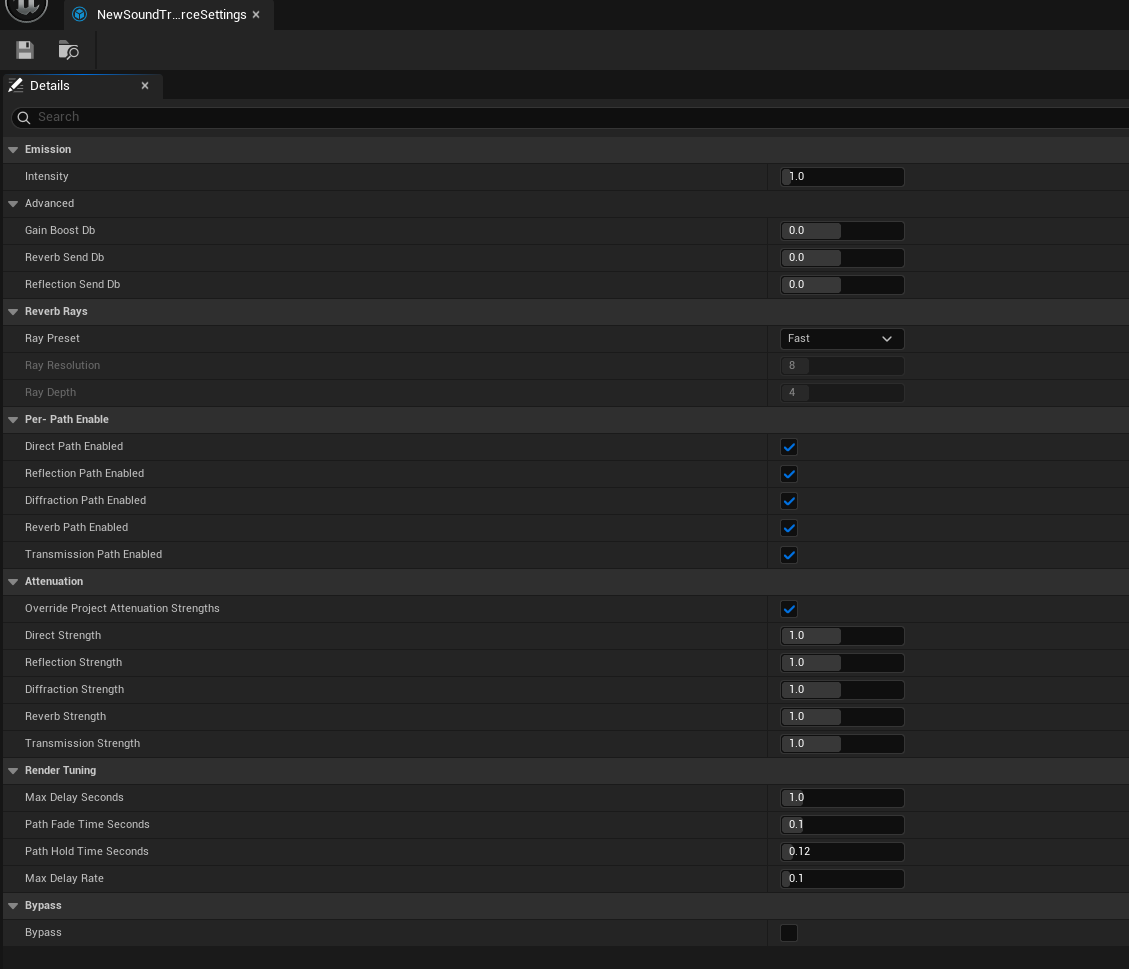
Create this asset from
Sounds > SoundTracing > SoundTracing Audio Spatialization Settings in the Content Browser.
Share one asset between sources with the same role instead of duplicating it per Audio Component.
Detail Properties
| Field | Default | Range/behavior |
|---|---|---|
Intensity | 1.0 | 0..10. Linear emission gain multiplied into every path |
Gain Boost Db | 0 dB | -24..24 dB. Additional gain above Intensity |
Reverb Send Db | 0 dB | -24..24 dB. Late-reverb send |
Reflection Send Db | 0 dB | -24..24 dB. Early-reflection send |
Ray Preset | Custom | Custom, Fast (8×8, depth 4), Middle (16×16, depth 4), Quality (24×24, depth 4). Anything but Custom overwrites the two values below. This is the Unity SoundTraceSource Reverb Ray Resolution and applies to every source sharing the asset |
Ray Resolution | 24 | 0..32. 0 inherits the Listener grid; otherwise uses an N × N source reverb grid |
Ray Depth | 4 | 0..16. 0 inherits Listener depth |
Per-path … Path Enabled | All enabled | Enables or disables Direct, Reflection, Diffraction, Reverb, and Transmission per source. |
Override Project Attenuation Strengths | On | When off, uses the Project Settings attenuation values |
Per-path Strength | 1.0 | 0.5..1.5. Higher values attenuate faster at the same distance |
Max Delay Seconds | 1.0 s | 0.01..5 s. Maximum propagation delay retained by the renderer |
Path Fade Time Seconds | 0.066 s | 0.001..0.5 s. Fade time for path entry/removal |
Path Hold Time Seconds | 0.120 s | 0..1 s. Holds a missing non-direct path before fading. 0 disables hold |
Max Delay Rate | 0.1 | 0.001..0.999. Maximum delay change per sample |
Bypass | Off | Passes input through without SoundTrace spatial rendering |
Connect to an Audio Component
Assign the source settings asset to Sound Attenuation, then assign that Attenuation asset to the Audio Component. Sources of the same kind can share both assets.
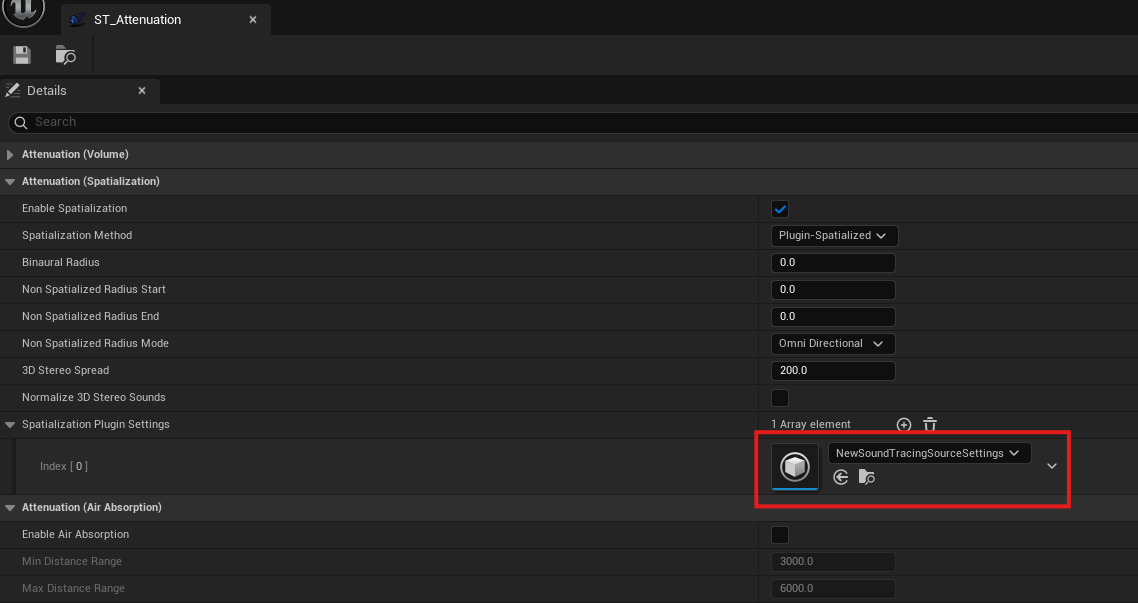
Enable Enable Spatialization and select plugin spatialization. Add the SoundTracing Audio Spatialization Settings asset to the Spatialization Plugin Settings array.
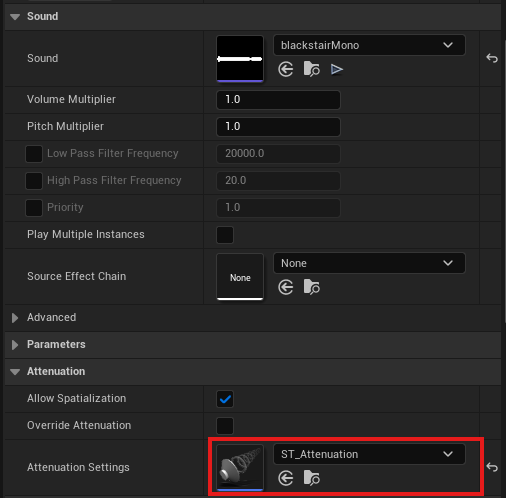
Enable Allow Spatialization and disable Override Attenuation on the Audio Component. Assign the previously created Sound Attenuation to Attenuation Settings.
Public methods
These are C++ methods on USoundTracingSourceSettings. Use the Audio Component's Play() and Stop() to control playback.
| Method | Return value / behavior |
|---|---|
GetEffectiveAttenuationStrengths() | FSoundTracingAttenuationStrengths. Returns source or project strengths according to the override setting. |
ApplyRayPreset() | Updates RayResolution and RayDepth from RayPreset. Leaves values unchanged in Custom. |
Sound Object
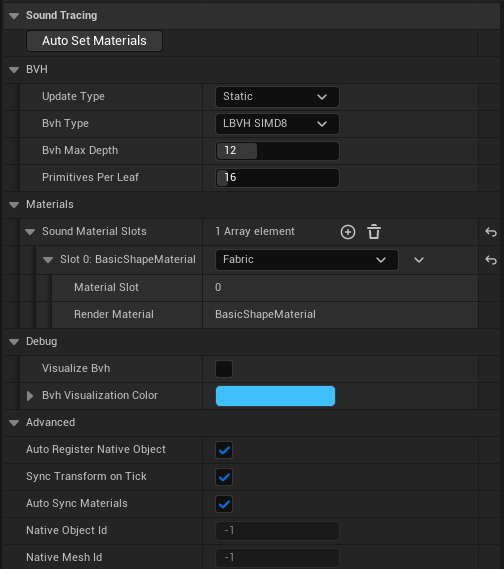
SoundTracingObjectComponent registers its immediate parent StaticMeshComponent or
SkinnedMeshComponent as acoustic geometry. Add it directly below the target mesh component,
not at an arbitrary place in the Actor hierarchy.
Detail Properties
| Field | Default | Description |
|---|---|---|
Auto Register Native Object | On | Registers the native object at Begin Play |
Sync Transform On Tick | On | Updates the native transform only when the parent changes |
Auto Sync Materials | On | Refreshes slots when parent render materials change |
Update Type | Static | Geometry update policy |
BVH Type | LBVH SIMD8 | Native acceleration-structure builder |
BVH Max Depth | 12 | 1..32 |
Primitives Per Leaf | 16 | 1..128 |
Sync Skinned Vertices On Tick | Off | Uploads the current skeletal pose each tick in Refit mode |
Sound Material Slots | Generated | Maps render-material slots to SoundTrace presets |
Visualize BVH | Off | Draws BVH lines with the Editor component visualizer |
BVH Visualization Color | Cyan | BVH display color. |
Native Object Id, Native Mesh Id | -1 | Registered native IDs. Read-only; -1 when unregistered. |
A Static Mesh uses Forced LOD when set, otherwise LOD 0. A Skinned Mesh also prefers Forced LOD and uploads the current pose vertices.
Geometry and BVH
| BVH Type | Refit | GPU backend | Description |
|---|---|---|---|
HKDTree | Supported | No | KD-split traversal; switches to BVH-style fallback after refit |
LBVH | Supported | No | Scalar Morton LBVH |
LBVH SIMD4 | Supported | Yes | 4-wide leaf intersection |
LBVH SIMD8 | Supported | Yes | Current default |
LBVH SIMD16 | Supported | Yes | 16-wide leaf intersection |
If GPU mode is requested with HKDTree or scalar LBVH, the plugin substitutes the
GPU-uploadable LBVH SIMD8 native builder.
| Update Type | Use |
|---|---|
Static | Level geometry that never moves |
Dynamic | Transform-only doors and props; updates the TLAS instance |
Refit | Skinned Mesh vertices whose topology stays fixed |
Rebuild | Geometry whose triangle topology changes and needs a new BVH |
To follow skinned animation, enable both Update Type = Refit and
Sync Skinned Vertices On Tick = true. The plugin uploads current-pose vertices and refits the
native mesh. This performs CPU skinning and a vertex upload every tick, so limit the number and
LOD of updated objects.
Objects with the same Static Mesh, LOD, material mapping, and BVH settings share one native BVH. The Skinned Mesh cache key includes the component path, so distinct poses do not overwrite the same native mesh.
Public methods
| Method | Behavior |
|---|---|
RegisterNativeObject() | Registers the parent geometry in the native scene |
UnregisterNativeObject() | Removes the native object registration |
SyncNativeTransform() | Immediately applies the parent transform |
RefreshNativeMesh() | Reuploads geometry after a mesh or material change |
SyncMaterialsFromParent() (Auto Set Materials) | Automatically matches presets using parent render material names and aliases. |
SetMaterialPresetIndex(Slot, Preset) | Changes one slot's preset index |
SetMaterialPresetForAllSlots(Preset) | Applies one preset to every slot |
SetUpdateType(Type) | Changes the native object update policy |
GetResolvedMeshLodIndex() | Returns the LOD index actually uploaded |
GetUploadedTriangleCount() | Returns the triangle count from the last upload |
IsRegistered() | Returns whether both native object and mesh are valid |
GetNativeObjectId(), GetNativeMeshId() | Returns registered native IDs; -1 when unregistered. |
GetTargetMeshComponent() | Returns the immediate parent mesh component used for registration. |
static IsGpuCompatibleBvhType(ESoundTracingBvhType InBvhType) | Returns true for SIMD LBVH variants. |
GetBvhMaxDepth(), GetPrimitivesPerLeafNode(), GetBvhType() | Queries BVH settings in C++. |
GetSoundMaterialSlots() | Returns a read-only reference to acoustic material slots in C++. |
BuildNativeBvhDebugLineSegments(TArray<FVector>& OutLocalLinePoints) | Retrieves BVH debug segments in local coordinates from C++. |
ShouldVisualizeBvh(), GetBvhVisualizationColor() | Editor-only C++ methods for querying BVH visibility and color. |
Acoustic materials and Transmission
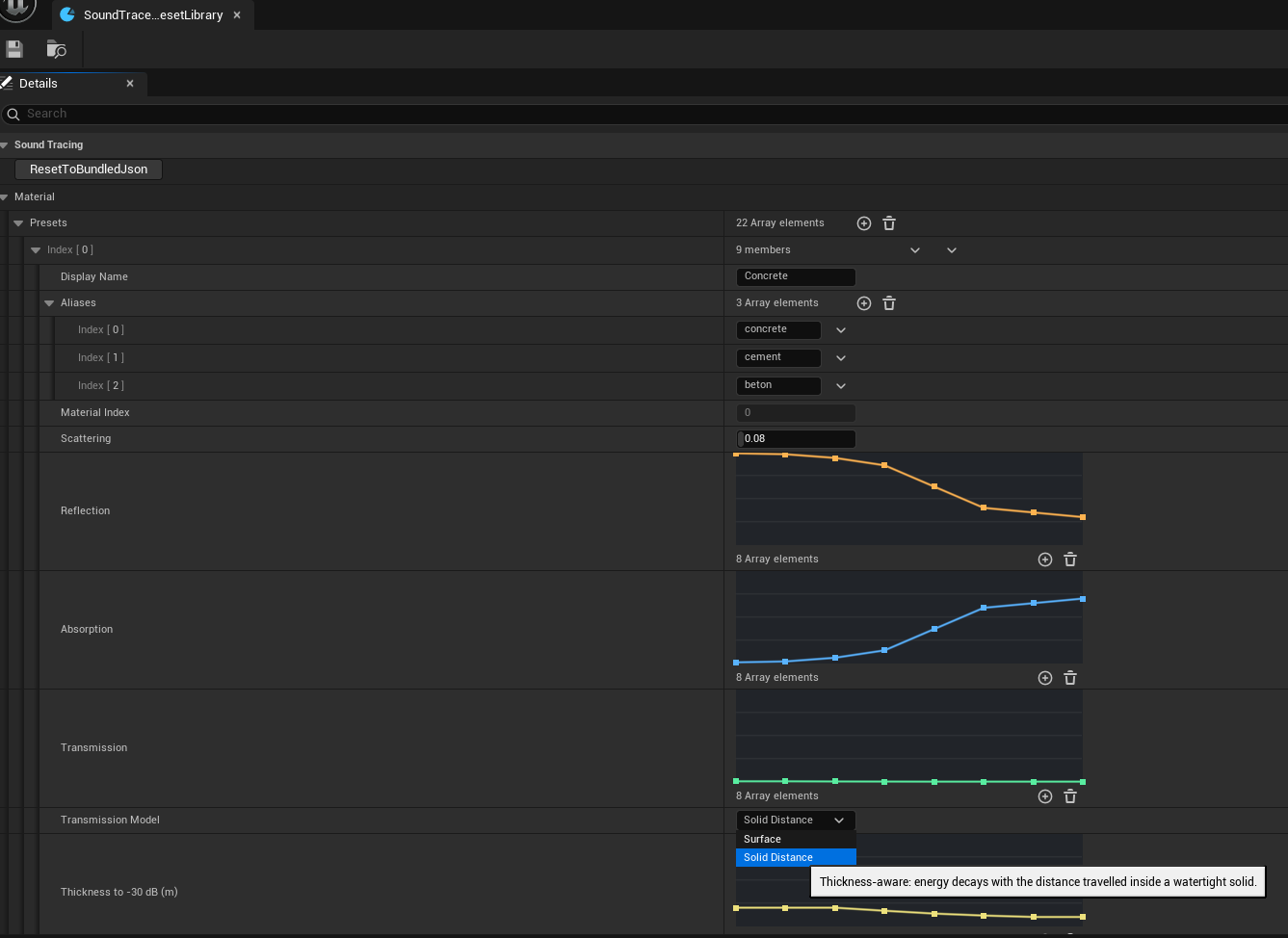
Detail Properties
The default library is
Content/STData/Material/SoundTraceMaterialPresetLibrary.uasset in the plugin. It currently
contains the same 22-material table as the Unity and Web SDKs.
Create a custom library from
Sounds > SoundTracing > SoundTracing Material Preset Library in the Content Browser. A new
asset copies the active default library. Select it under Material Preset Library in Project
Settings and restart the Editor.
| Field | Description |
|---|---|
Presets | Acoustic material list. |
Display Name, Aliases | Display name and aliases used to match render materials automatically. |
Material Index | Native material index, maintained in library list order. |
Scattering | 0..1. Balance between specular reflection and scattering. |
Reflection, Absorption, Transmission | Eight-band reflection, absorption, and transmission energy coefficients, each in 0..1. |
Transmission Model | Selects Surface or Solid Distance. |
Thickness to -30 dB (m) | Per-band attenuation reference distance for Solid Distance. |
ResetToBundledJson | Restores the preset list from bundled JSON. |
Band centers are 67.5, 125, 250, 500, 1000, 2000, 4000, and 8000 Hz.
Click or drag the Editor band graph to edit values.
Transmission Model
| Model | Input | Geometry requirement |
|---|---|---|
Surface | Per-band energy coefficient 0..1 remaining after one surface crossing | Works with open faces and thin surfaces |
Solid Distance | Per-band reference distance in meters at which transmitted energy reaches -30 dB | Requires a closed volume with consistent face orientation |
A Solid Distance value is not the object's actual thickness. Runtime measures the distance
travelled inside geometry and attenuates it against this reference distance. 0 completely
blocks the band.
ImportFromJson, ExportToJson, and ResetToBundledJson use the shared Unity/Web
soundMaterial.json format. A missing transmissionDistanceToMinus30DbMeters means
Surface; eight valid values mean Solid Distance.
Public methods
| Method | Return value / behavior |
|---|---|
NormalizePresets() | Normalizes preset indices and per-band values. |
GetPresetCount() | Returns the number of presets. |
FindBestPresetIndexByName(const FString& RenderMaterialName) | Finds a preset index matching the render material name or aliases. |
GetPresetDisplayName(int32 PresetIndex) | Returns the preset's display name. |
ResetToBundledJson() | Replaces the list with bundled JSON. Call through the editor button or C++. |
ExportToJson() | Returns a string in soundMaterial.json format. |
ImportFromJson(const FString& JsonText) | Replaces the list from JSON. Returns false if no materials can be parsed. |
FindBestPresetIndex(const UMaterialInterface* RenderMaterial) | Finds a preset matching the render material in C++. |
FindPresetIndexByToken(const FString& Token, int32 FallbackIndex) | Finds a preset by token in C++, using the fallback index if no match exists. |
static GetFrequencyBandCentersHz() | Returns a read-only reference to the eight center frequencies in C++. |
static LoadDefaultLibrary() | Loads the project-selected or default library in C++. |
static MakeFallbackPresets() | Creates the fallback preset array in C++. |
static ParseSoundMaterialJson(const FString& JsonText, TArray<FSoundTracingMaterialPreset>& OutPresets) | Parses JSON into a preset array in C++. |
static SerializeSoundMaterialJson(const TArray<FSoundTracingMaterialPreset>& InPresets) | Serializes a preset array to a JSON string in C++. |
static LoadBundledJson(FString& OutJson) | Reads bundled JSON into a string and returns success in C++. |
Public properties
| Property | Type / access | Description |
|---|---|---|
Presets | TArray<FSoundTracingMaterialPreset> / read/write | Preset array stored in the library. |
FrequencyBandCount | static constexpr int32 / constant | Number of frequency bands: 8. |
Sound Path Visualizer

Search for Sound Tracing Path Visualizer in the Actor's Add Component menu and add it. This C++ component creates the Niagara component needed for path rendering.
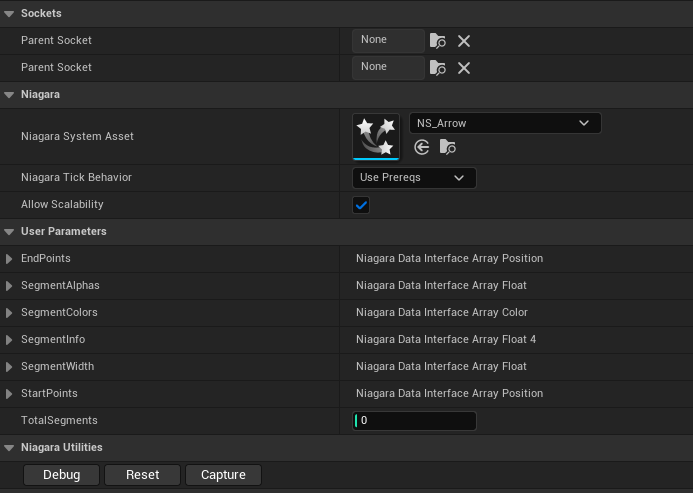
Add SoundTracingPathVisualizerComponent to an Actor to display the latest propagation frame
as Niagara line segments.
:::note Bundled NS_Arrow asset paths
Niagara System Asset uses the plugin's bundled NS_Arrow asset. Its default path is /SoundTracing/FX/NS_Arrow.NS_Arrow. The associated material is /SoundTracing/Materials/MAT_ArrowLine. Keep both Content/FX and Content/Materials when installing or moving the plugin, and check that the Niagara system and material references remain valid.
:::
Detail Properties
| Field | Default | Description |
|---|---|---|
Visualization Enabled | On | Enables path display |
Refresh Interval Ms | 50 | Minimum visualization refresh interval; does not affect propagation |
Max Visualized Paths | 1024 | Maximum displayed paths, range 16..5000 |
Path Alpha Intensity | 0.5 | Segment alpha strength, range 0.01..2.0 |
Niagara System | Empty | Uses the plugin's default Niagara system when empty |
Colors are Direct=red, Reflection=orange, Diffraction=green, Transmission=cyan, and Reverb=purple. Disable visualization for performance measurements.
Public methods
| Method | Return value / behavior |
|---|---|
SetVisualizationEnabled(bool bEnabled) | Enables or disables path display at runtime. |
GetActivePathCount() | int32. Returns the current number of paths retained by the visualizer. |
Sample demos
The three Unity SDK samples are also available as Unreal levels and Blueprints.
In the Content Browser, enable Settings > Show Plugin Content, open a level under
SoundTracing Content > Samples > Maps, and press Play.
Each level has its own GameMode and camera, and audio starts automatically.
All three demos share these controls:
| Button | Keyboard | Action |
|---|---|---|
Play | P | Plays the music or conversation from the beginning. |
Pause / Resume | Space | Pauses or resumes playback. |
Stop | X | Stops playback. |
Reset | R | Restarts the demo. Sample 02 also resets positions and the acoustic material. |
Show / hide UI | — | Hides or shows the control panel on the left. |
Levels are in /SoundTracing/Samples/Maps, behavior and UI Blueprints are in
/SoundTracing/Samples/Blueprints, and per-source settings are in
/SoundTracing/Samples/Audio/Settings.
ST_SampleScene01
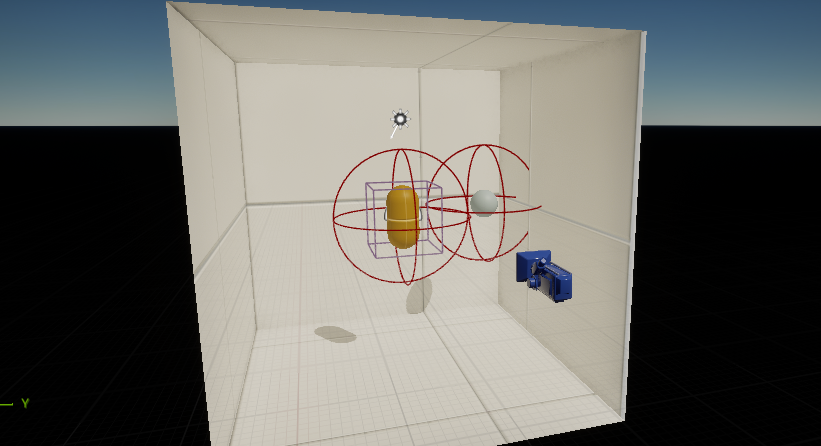
Explore basic spatial audio with one source and a fixed listener in a 10 m room. Listen to the music and examine how room geometry, acoustic materials, and visualized paths relate to the sound.
Use SoundTrace / Unreal dry to switch between SoundTrace output and Unreal's regular output.
Both outputs stay synchronized, so you can compare spatial cues and reverberation without restarting the music.
The behavior Blueprint is BP_Sample01, and the UI is WBP_Sample01.
ST_SampleScene02
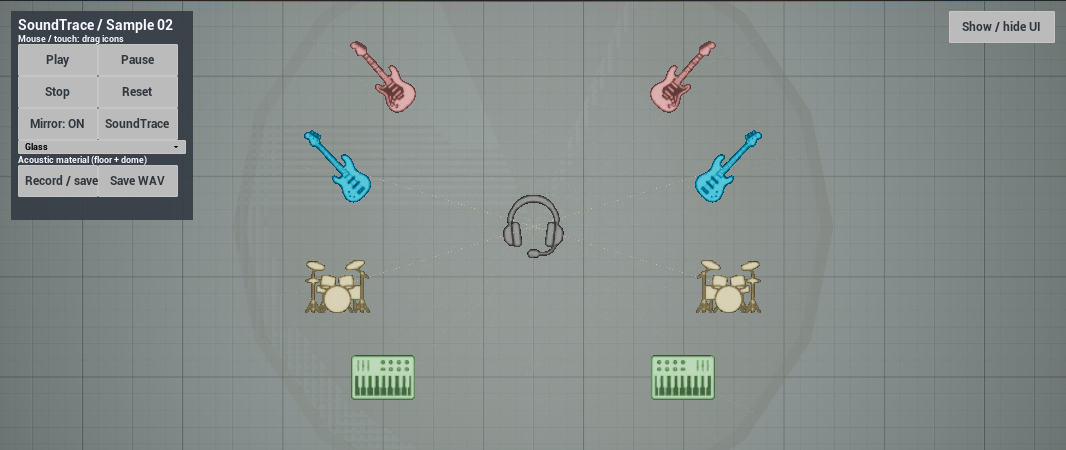
Move eight sources arranged as left/right guitar, bass, drum, and synth pairs, along with the headphone-shaped listener, in a top-down view. Quartz synchronizes playback so you can compare directionality and room response while changing positions and acoustic materials.
| Control | Action |
|---|---|
| Drag an icon | Use the left mouse button or the first touch to move a source or listener. Its height and the initial grab offset are preserved. |
Mirror: ON / OFF | Moves the opposite source symmetrically while dragging. Enabling it does not immediately realign positions. |
SoundTrace / Unreal dry | Switches between SoundTrace output and Unreal's regular output while preserving playback position. |
Acoustic material (floor + dome) | Changes the acoustic material of both the floor and dome. The initial preset is Glass; this setting is separate from their visual materials. |
Reset / R | Restores source/listener positions, Mirror: ON, and the Glass acoustic material, then restarts playback. |
Record / save / F9 | Starts recording the output. Press again while recording to save a WAV and end the recording. |
Save WAV / F10 | Saves the active recording as a WAV and ends it. |
Recordings are saved with unique filenames in the project's Saved/BouncedWavFiles folder.
Saving a WAV in Unreal ends the current recording, unlike Unity's snapshot export during recording.
Start dragging inside an icon: drags starting over the UI or within 24 px of the screen edge are ignored.
The behavior Blueprint is BP_Sample02, and the UI is WBP_Sample02.
ST_SampleScene03
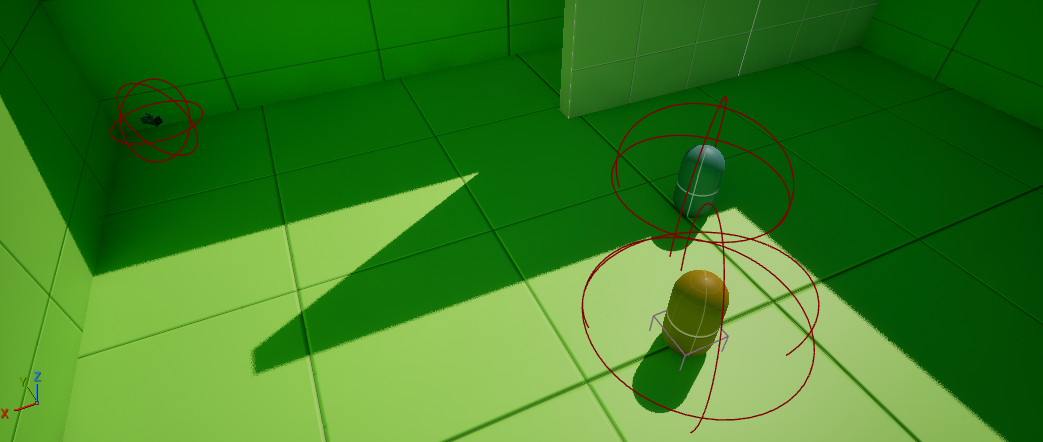
Two sources alternate through eight male and female voice clips in a loop, in a space with walls and partitions. Move the listener with the camera to hear changes in occlusion, reflections, HRTF directionality, and room reverberation.
| Control | Action |
|---|---|
WASD | Moves forward, backward, left, and right. |
Q / E | Moves down/up. |
| Mouse movement | Rotates the view. |
Esc | Releases mouse look to interact with the UI. Use Shift+F1 to release the cursor in editor PIE. |
| Right mouse click | Resumes mouse look. |
Reset / R | Restarts the conversation from the beginning at the current camera position. |
In editor PIE, Esc ends the play session.
The behavior Blueprint is BP_Sample03, and the UI is WBP_Sample03.
Troubleshooting tips
| Symptom | Check |
|---|---|
| Plugin missing from Audio selection | Check SoundTracing activation, the C++ module build, target-platform Audio settings, and editor restart. |
| Native library load or ABI error | Use the plugin and native library from the same SDK distribution, and ensure ThirdParty files are packaged. |
| No sound or no spatialization | Check the mono Sound Wave, Audio Component playback, both global Audio plugins, Spatialization activation, and asset assignments. |
| Source settings not applied | Check the Audio Component → Sound Attenuation → SoundTracing Source Settings chain and Override Attenuation. |
| Unexpected listener position | With Drive Listener Transform enabled, the component drives the position; otherwise, the Unreal audio listener is used. |
| Listener replacement warning | Keep one active Listener Component per World. |
| Geometry not reflected in audio | Check that the Object Component is an immediate child of a supported mesh and that mesh data and triangles exist. |
| Skinned animation not reflected | Check Update Type = Refit, Sync Skinned Vertices On Tick = true, and LOD. |
| GPU not active | Check GetGpuBackendStatus() and Output Log. On Windows, deploy exaSound.dll and webgpu_dawn.dll together. |
| Paths not visible | Check Niagara activation, Visualization Enabled, source/listener path settings, and GetLastValidPathCount(). |
| Pitch spike after teleporting | Call the Listener or Subsystem's ResetMotionState() immediately after changing position. |
| Dropouts with many sources | Adjust propagation and audio buffers in the order below. |
Dropouts with many sources
- Set
Propagation Interval (ms)to50to reduce propagation request frequency. - Lower
Source Ray Resolution Capto8..16, or set the source'sRay PresettoFast. - Start with listener settings
Quality Preset = Fast,HRTF Path Budget = 1, andRender Band Tier = Merged4. - Set
Propagation Thread Countto2..3and restart to leave execution time for game, render, and audio threads. - Set
Buffers To Enqueueto at least2. AdjustCallback Buffer Frame Sizeif needed. - Disable path visualization and change one setting at a time when comparing results.
Runtime status
SoundTracing.Status
SoundTracing.DumpGpuPropagationStats
SoundTracing.Status reports the native version, readiness, processing backend, object/path counts, and listener settings. SoundTracing.DumpGpuPropagationStats reports GPU execution and CPU fallback statistics.